

Cues & triggers
A cue is a trigger → action pair attached to a track. When the trigger fires (the track loads, the playhead hits 1:32, the fader comes up…), the action executes (a MIDI note goes out, a CC ramps, a command runs).
Cues live on tracks in your setlist: Tracks page → select a track → Cues section.
Adding and editing cues
Section titled “Adding and editing cues”The Cues section has four quick-add buttons — + On-Load, + On-Play, + On-Unload, + Timeline — which create a cue with that trigger pre-set. Click any cue row to open the editor.
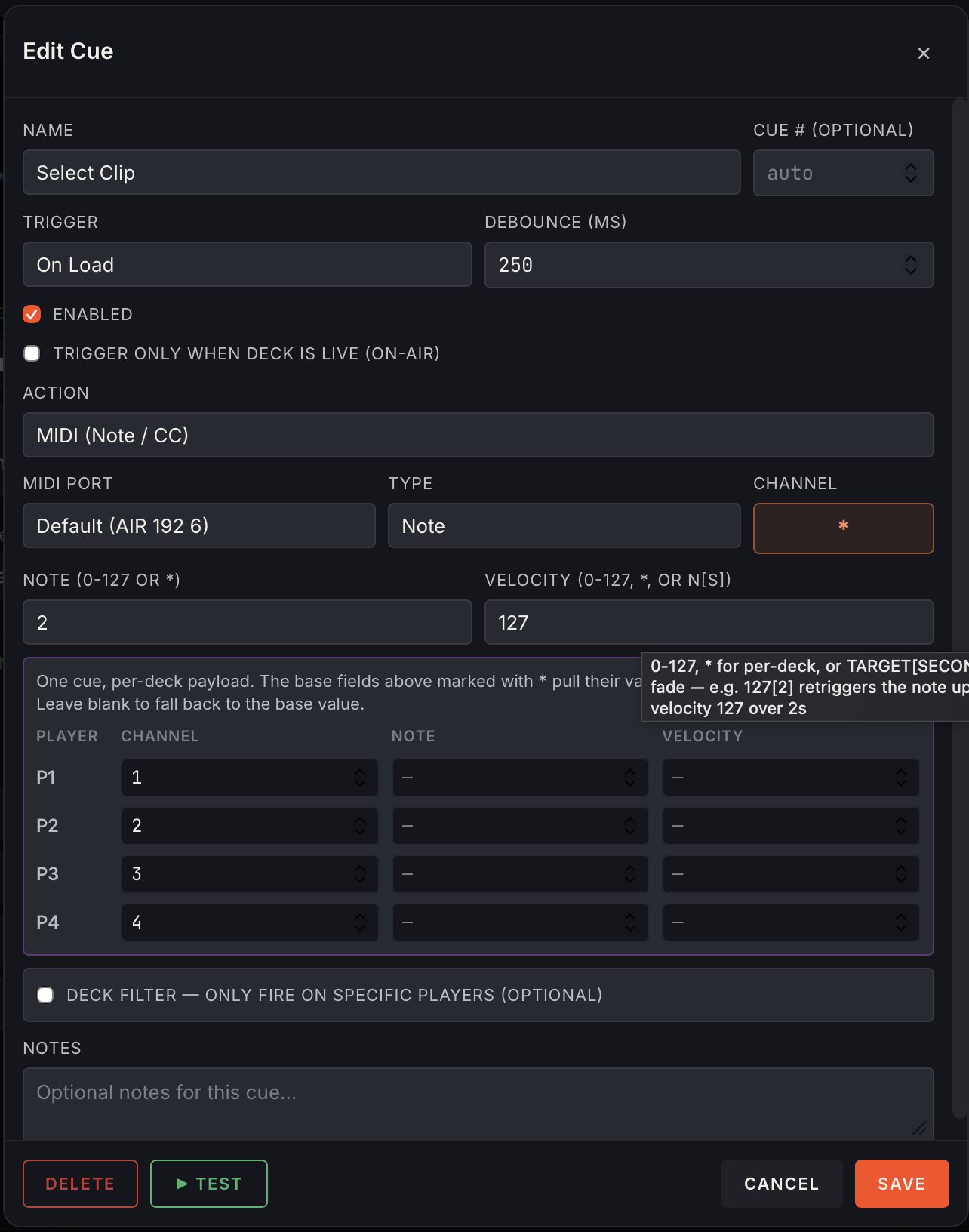
In the editor:
- Name — what shows on the waveform markers, cue lists, and activity history.
- Cue number — optional; decimals allowed (
3.5slots between 3 and 4). Unnumbered cues auto-number by position. - Trigger and (for timeline cues) Trigger Time.
- Action type and its fields (below).
- Notes — free text; shows beside the cue name in the deck cue panel, so keep the first few words meaningful.
- Test — fires the action right now, bypassing all gating. The fastest way to verify the receiving end reacts. Uses your unsaved edits.
- Enter saves and closes; Escape cancels. (Enter inside the notes field makes a new line — use the Save button there.)
Timeline cues can also be repositioned by dragging their marker pill on the waveform — no editor round-trip needed.
Trigger types
Section titled “Trigger types”| Trigger | Fires when |
|---|---|
| On Load | The track is loaded onto a deck (before play) |
| On Play | Transport goes from stopped/paused → playing |
| On Unload | The track is ejected or replaced |
| On Air | The deck goes live — channel fader up on the DJM |
| Off Air | The deck goes off-air |
| Timeline | The playhead crosses the cue’s trigger time |
Notes on behaviour:
- Timeline cues re-arm if the DJ rewinds back past them — loop back over a drop and the cue fires again on the next pass.
- On-Air / Off-Air transitions are debounced against mixer noise, and these trigger types (plus load/unload) carry a built-in 5-second minimum between re-fires of the same cue — flicker on the fader won’t machine-gun your desk.
- Each cue also has its own Debounce (ms) on top of that (default 500 ms).
Action types
Section titled “Action types”MIDI (Note / CC)
Section titled “MIDI (Note / CC)”| Field | Description |
|---|---|
| MIDI Port | Defaults to the cue output port from Settings → MIDI; override per cue if needed |
| Channel | 1–16 |
| Note + Velocity | For note messages. Velocity 0 sends Note Off |
| CC + Value | For control-change messages |
| Fade | Append [seconds] to a value — 127[2] ramps from the last-sent value to 127 over 2 s (~30 updates/s). Works on CC values and velocities |
Per-deck overrides
Section titled “Per-deck overrides”One cue, different values per deck. Type * in a field (channel, note, velocity, cc, value) and fill the per-deck table — the value is looked up by the deck that fired the cue:
Deck 1 → CH1 NOTE60 VEL127Deck 2 → CH2 NOTE62 VEL127Deck numbers here are the display player numbers (P1–P4 as shown in the UI). The activity history always shows the resolved values that actually went out, never the *.
External Command
Section titled “External Command”Runs a shell command on the machine. Use for triggering scripts, OSC senders, anything CLI-able.
Internal (Helm system)
Section titled “Internal (Helm system)”Drives Helm DJ itself from a cue:
| Command | Effect |
|---|---|
ltc_assign_player | Point the LTC output at the deck that fired the cue |
timecode_enable / timecode_disable | Turn timecode output on/off |
Marker (no output)
Section titled “Marker (no output)”A label only — nothing is sent. Markers still show on the waveform and log in the activity history when crossed, so they’re useful for annotating structure (“drop”, “outro starts”) and for verifying timing before you commit to a real action.
Cue options
Section titled “Cue options”- Trigger only when deck is live (on-air) — the cue is skipped unless the deck is on-air. The key to rehearsal-safe programming: the DJ can practice with the fader down and nothing fires; push the fader up for the show and everything works.
- Player numbers filter — restrict a cue to fire only from specific decks (e.g.
1, 2). - Enable toggle — disable a cue without deleting it; disabled cues show dimmed in the list and log as skipped.
Runtime controls
Section titled “Runtime controls”- LIVE (top bar) — global arm. Disarmed = every trigger evaluated and logged, nothing sent. Rehearse with it off, verify in the activity panel, then arm.
- STOP (top bar) — panic. Suppresses all cue output instantly, silences LTC, freezes MTC, stops MIDI Clock. Click again to clear.
- Per-deck automation switch — disable one deck’s cues without touching the others.
The activity history
Section titled “The activity history”The panel docked at the bottom of the Decks page logs every trigger evaluation:
| Column | Shows |
|---|---|
| Time | When it happened |
| Deck | Player number that fired it |
| Cue | Name + the resolved action (CH1 NOTE60 VEL127) |
| Outcome | fired, or skipped with the reason (off-air, debounced, disabled…) |
This is your ground truth during a show — if the desk didn’t react, the history tells you whether Helm DJ sent the message (look downstream) or skipped it (and why).